CF Monitor

Self-contained Cloudflare account monitoring. One worker. Zero migrations.

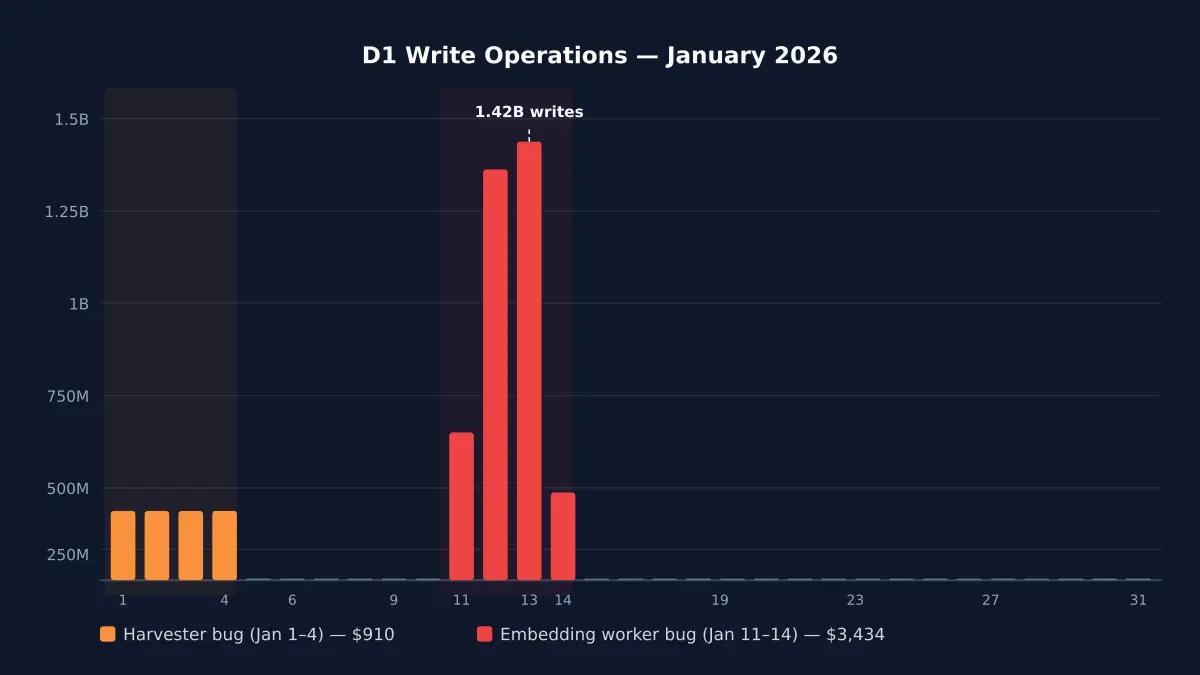
Self-contained Cloudflare Workers monitoring. One worker, zero D1. Circuit breakers, budget enforcement, and error collection — born from a $4,868 bill.

Cloudflare Released

What it stops

Catches runaway costs before they reach your invoice

Infinite write loops

A D1 write loop ran for four days — 4.8 billion rows, $4,868 bill. cf-monitor's per-invocation limits (default: 1,000 D1 writes) would have stopped it on the first request.

Stop infinite loops on the first request, not the fourth day

Budget overruns

Daily and monthly spend limits aligned to your actual Cloudflare billing period. Warnings at 70% and 90%, hard circuit breaker at 100%.

Get Slack warnings at 70% spend instead of surprises at invoice time

Silent worker failures

Tail worker captures all 7 non-OK outcomes — exceptions, CPU exceeded, memory exceeded, canceled, stream disconnected, script not found. Auto-creates GitHub issues with priority labels.

See which worker feature is burning through your budget

Coverage gaps

Gap detection identifies workers that aren't sending telemetry. Worker auto-discovery via CF API means nothing slips through unmonitored.

Kill everything with one KV write when something goes wrong at 2am

What CF Monitor includes

  • One-line SDK wrapper

    import { monitor } from '@littlebearapps/cf-monitor' — wraps fetch, cron, and queue handlers. Auto-detects worker name, feature IDs, and all 8 binding types. Zero config needed.

  • Three-tier circuit breakers

    Per-invocation limits (immediate), daily budgets (hourly enforcement), and monthly budgets (billing-period-aware). Feature-level, account-level, and global kill switches.

  • Zero D1, zero queues

    Analytics Engine for metrics (100M writes/month free), KV for state. No database migrations, ever. The monitor worker itself costs ~265 KV ops/day.

  • Error collection + GitHub issues

    Tail worker captures errors from all monitored workers. FNV fingerprinting deduplicates. Auto-creates GitHub issues with P0-P4 priority labels. Bidirectional webhook sync.

  • 8 binding types tracked

    D1 (reads, writes, rows), KV (reads, writes, deletes, lists), R2 (Class A, Class B), Workers AI (requests, neurons), Vectorize, Queue, Durable Objects, and Workflows — all automatic.

  • Plan-aware budgets

    Auto-detects Workers Free vs Paid plan via Subscriptions API. Selects correct budget defaults per plan. Monthly budgets align to your actual billing period, not calendar months.

  • Account usage dashboard

    Hourly GraphQL queries for 5 services (Workers, D1, KV, R2, Durable Objects). Shows percentage of plan allowance used. GET /usage endpoint and npx cf-monitor usage CLI.

  • Slack alerts with dedup

    Budget warnings (70%, 90%, 100%), gap alerts, cost spike detection, and self-monitoring staleness alerts. All deduplicated via KV to prevent alert fatigue.

  • Self-monitoring

    cf-monitor monitors itself — tracks cron execution, error counts, and handler staleness. GET /self-health returns 200 when healthy, 503 when stale. Slack alerts if crons stop running.

  • Worker auto-discovery

    Daily cron discovers all workers on the account via Cloudflare API. No manual registry — new workers appear automatically. npx cf-monitor coverage shows monitored vs unmonitored.

  • 10-command CLI

    init, deploy, wire, status, coverage, secret, usage, config sync, config validate, upgrade. From zero to fully monitored account in 3 commands.

  • Security hardened

    Admin endpoint auth (timing-safe token comparison), CLI command injection prevention, webhook replay protection, GraphQL input validation, markdown escaping, and module-private symbols.

How it works

One npm install. One worker. Full account observability.

Wrap your workers
Deploy the monitor worker
Wire tail consumers
Circuit breakers protect you
What exactly does it access?

What it accesses

  • Cloudflare Workers binding usage (D1, KV, R2, AI, Vectorize, Queue, DO, Workflow)
  • Cloudflare GraphQL Analytics API for account-wide metrics
  • Worker tail events for error capture

Where it stores

  • Metrics: Analytics Engine dataset on your Cloudflare account (90-day retention)
  • State: KV namespace on your Cloudflare account (circuit breakers, budgets, error dedup)
  • No D1 database — zero migrations, ever

Delete the cf-monitor Worker and KV namespace from your Cloudflare dashboard to remove all data

Network calls

  • Cloudflare GraphQL Analytics API (for usage collection)
  • GitHub API (for error issue creation, optional)
  • Slack webhook (for alerts, optional)
  • No Little Bear Apps servers involved — everything runs on your infrastructure

Remove the monitor() wrapper to disable tracking

Requires a Cloudflare Workers account

Get started in 60 seconds

Copy this prompt and paste it into any AI assistant:

I want to install cf-monitor (@littlebearapps/cf-monitor, https://github.com/littlebearapps/cf-monitor) on my Cloudflare Workers account. Please guide me through setup: init, deploy, wire, and wrapping my handlers with monitor().

Quick start

Install and configure

"In January 2026, a D1 write loop ran for four days across two projects. 4.8 billion rows. $4,868 on a single invoice."

Nathan
N
Nathan

Questions about CF Monitor

What is cf-monitor?
cf-monitor is a self-contained monitoring SDK for Cloudflare Workers. Install it on any CF account and get circuit breakers, budget enforcement, error collection, and gap detection from a single worker. No central infrastructure needed.
How is this different from the original centralised approach?
The original monitoring infrastructure used a centralised model — 10+ platform workers, D1 database with 61 migrations, cross-account HMAC forwarding. cf-monitor is the v2 replacement: one worker per account, Analytics Engine + KV only, zero D1. Born from the pain of operating the centralised model across 4 dedicated Cloudflare accounts.
Does it cost anything?
cf-monitor itself is free and open source (MIT licence). The monitor worker uses Analytics Engine (100M free writes/month) and KV (~265 ops/day for self-monitoring). On a Workers Paid plan, the infrastructure cost rounds to $0/month.
Will it break my workers if something goes wrong?
No. cf-monitor is fail-open by default — if KV is unreachable, AE writes fail, or any internal error occurs, your worker's response is never affected. The SDK wraps everything in try-catch at the boundary.
What bindings does it track?
D1 (reads, writes, rows), KV (reads, writes, deletes, lists), R2 (Class A, Class B), Workers AI (requests, neurons), Vectorize (queries, inserts), Queue (messages), Durable Objects (requests), and Workflows (invocations). All tracked automatically via ES Proxy — no code changes needed.
How do circuit breakers work?
Three tiers. Per-invocation limits (e.g. max 1,000 D1 writes per request) catch loops immediately. Daily and monthly budgets are enforced hourly via cron — warnings at 70% and 90%, hard circuit breaker at 100%. Circuit breakers auto-reset after a configurable TTL (default 1 hour).
How do I set it up?
Three commands: npx cf-monitor init (provisions KV + AE), npx cf-monitor deploy (deploys the monitor worker), npx cf-monitor wire --apply (auto-adds tail_consumers to all your wrangler configs). Then wrap your handlers with monitor().
Does it work on the Workers Free plan?
Yes. cf-monitor auto-detects your plan type via the Subscriptions API and selects appropriate budget defaults. Free plan workers have lower default limits matching the free tier allowances.
How does error collection work?
The monitor worker is added as a tail_consumer to all your workers. It captures exceptions, CPU/memory exceeded, canceled requests, and more. Each error is fingerprinted (FNV hash), deduplicated, and optionally creates a GitHub issue with priority labels (P0-P4).
Can I use it without GitHub or Slack?
Yes. GitHub issue creation and Slack alerts are optional. Without them, cf-monitor still provides circuit breakers, budget enforcement, and the /status, /errors, /budgets API endpoints.

cf-monitor vs centralised monitoring

  • 1 worker per account instead of 10+ platform workers and agents.
  • Analytics Engine + KV only — no D1 database, no 61 migrations, ever.
  • 1 cf-monitor.yaml instead of services.yaml + budgets.yaml + sync script.
  • 3 CLI commands to set up instead of 7+ manual steps.
  • 1 export (monitor()) instead of 18 sub-path exports.
  • Each account is self-contained — no cross-account HMAC forwarding needed.

Roadmap

Coming Soon

  • Planned: AI pattern discovery — detect transient vs real error patterns automatically
  • Planned: AI health reports — natural language daily/weekly account health summaries
  • Planned: Coverage auditor — AI scoring of SDK integration quality
  • Exploring: Web dashboard for cross-account visibility
  • Exploring: Terraform/Pulumi provider for declarative budget configuration

Changelog

github-actions[bot]github-actions[bot]
  • Tail handler produces zero observable output — added structured logging at every decision point: batch summary, dedup hits, rate limits, transient dedup, creation locks, missing GitHub config, and issue creation success
  • D1 GraphQL dataset name d1AnalyticsAdaptive does not exist — corrected to d1AnalyticsAdaptiveGroups with date_geq/date_leq filters in collect-metrics.ts
  • KV GraphQL fields readOperations/writeOperations/listOperations/deleteOperations do not exist on kvOperationsAdaptiveGroups — updated both collect-metrics.ts and collect-account-usage.ts to use dimensions { actionType } + sum { requests }, matching the R2 operations pattern
  • Unit tests increased from 290 to 296 `bash npm install @littlebearapps/cf-monitor@0.3.5 `
See release details on GitHub
nathanschramnathanschram
  • CORS headers on all GET endpoints — Access-Control-Allow-Origin: * enables browser-based monitoring dashboards
  • OPTIONS preflight handler returns 204 with CORS headers
  • excludeBindings option in MonitorConfig — skip proxy wrapping for specific env binding names that accidentally match CF binding method signatures
  • createTrackedEnv() accepts optional excludeBindings parameter, merged with internal skip set
See release details on GitHub