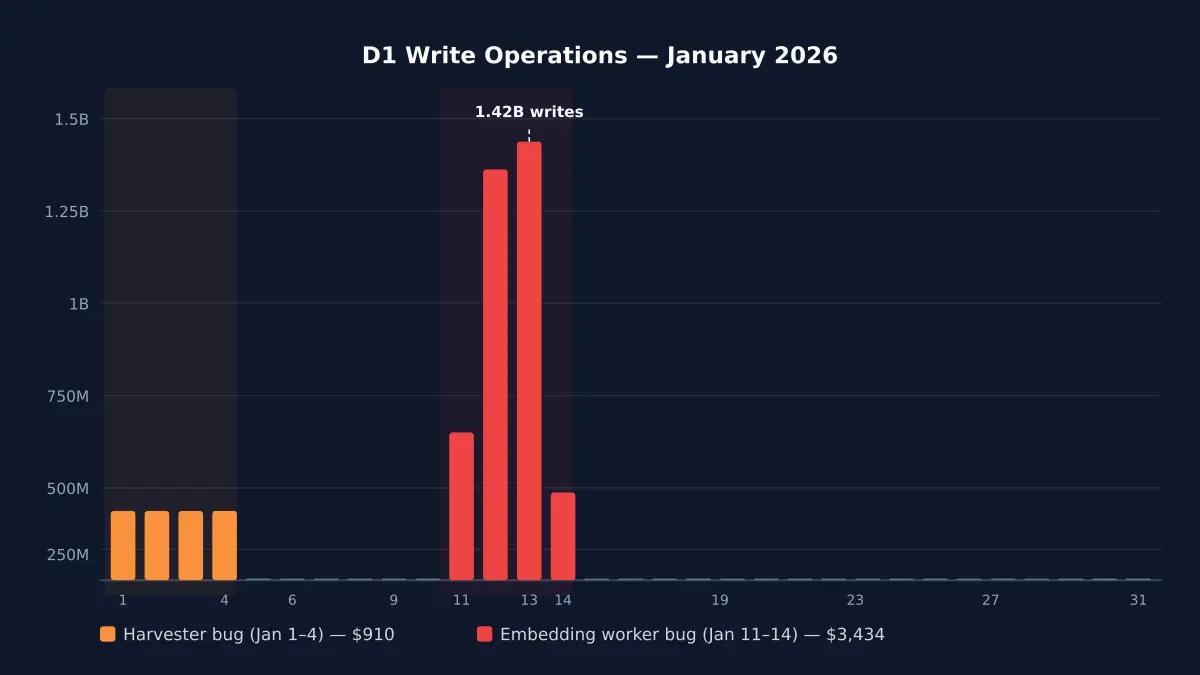
My $5/month Cloudflare bill hit $4,868 because of an infinite loop
Cloudflare D1 pricing in 2026 — what writes actually cost, where billing spirals, and how a bug turned my $5/month bill into $4,868 before I built circuit breakers.
Read more

Self-contained Cloudflare account monitoring. One worker. Zero migrations.
Self-contained Cloudflare Workers monitoring. One worker, zero D1. Circuit breakers, budget enforcement, and error collection — born from a $4,868 bill.
Catches runaway costs before they reach your invoice
A D1 write loop ran for four days — 4.8 billion rows, $4,868 bill. cf-monitor's per-invocation limits (default: 1,000 D1 writes) would have stopped it on the first request.
Daily and monthly spend limits aligned to your actual Cloudflare billing period. Warnings at 70% and 90%, hard circuit breaker at 100%.
Tail worker captures all 7 non-OK outcomes — exceptions, CPU exceeded, memory exceeded, canceled, stream disconnected, script not found. Auto-creates GitHub issues with priority labels.
Gap detection identifies workers that aren't sending telemetry. Worker auto-discovery via CF API means nothing slips through unmonitored.
import { monitor } from '@littlebearapps/cf-monitor' — wraps fetch, cron, and queue handlers. Auto-detects worker name, feature IDs, and all 8 binding types. Zero config needed.
Per-invocation limits (immediate), daily budgets (hourly enforcement), and monthly budgets (billing-period-aware). Feature-level, account-level, and global kill switches.
Analytics Engine for metrics (100M writes/month free), KV for state. No database migrations, ever. The monitor worker itself costs ~265 KV ops/day.
Tail worker captures errors from all monitored workers. FNV fingerprinting deduplicates. Auto-creates GitHub issues with P0-P4 priority labels. Bidirectional webhook sync. Configure once in cf-monitor.yaml — the CLI embeds your settings on every deploy.
D1 (reads, writes, rows), KV (reads, writes, deletes, lists), R2 (Class A, Class B), Workers AI (requests, neurons), Vectorize, Queue, Durable Objects, and Workflows — all automatic.
Auto-detects Workers Free vs Paid plan via Subscriptions API. Selects correct budget defaults per plan. Monthly budgets align to your actual billing period, not calendar months.
Hourly GraphQL queries for 5 services (Workers, D1, KV, R2, Durable Objects). Shows percentage of plan allowance used. GET /usage endpoint and npx cf-monitor usage CLI.
Budget warnings (70%, 90%, 100%), gap alerts, cost spike detection, and self-monitoring staleness alerts. All deduplicated via KV to prevent alert fatigue.
cf-monitor monitors itself — tracks cron execution, error counts, and handler staleness. GET /self-health returns 200 when healthy, 503 when stale. Slack alerts if crons stop running.
Daily cron discovers all workers on the account via Cloudflare API. No manual registry — new workers appear automatically. npx cf-monitor coverage shows monitored vs unmonitored.
init, deploy, wire, status, coverage, secret, usage, config sync, config validate, upgrade, and migrate. From zero to fully monitored account in 3 commands.
Admin endpoint auth (timing-safe token comparison), CLI command injection prevention, webhook replay protection, GraphQL input validation, markdown escaping, and module-private symbols.
One npm install. One worker. Full account observability.
Delete the cf-monitor Worker and KV namespace from your Cloudflare dashboard to remove all data
Remove the monitor() wrapper to disable tracking
Requires a Cloudflare Workers account
Copy this prompt and paste it into any AI assistant:
Install and configure
"In January 2026, a D1 write loop ran for four days across two projects. 4.8 billion rows. $4,868 on a single invoice."
Also by Little Bear Apps