

Untether

Code from anywhere with Claude Code, Codex, OpenCode and Pi

Telegram Released

Telegram bridge for AI coding agents

Voice, text, files, and approvals — all from Telegram, wherever you are.

What Untether includes

Every engine gets the core features. Some support deeper integration.

Feature
Claude Code
Codex
OpenCode
Pi
Progress streaming
Session resume
Terminal resume (/continue)
2
Voice input
Model override
Verbose progress
Error hints
Preamble injection
Cost tracking
1 1
Reasoning/effort levels
——
Pre-run approval policy
3——
Interactive approvals
———
Plan mode
———
Ask mode (option buttons)
———
Diff preview
———
Live sessions and background tasks
———
Steer follow-ups (/steer)
———
Context % in status line
———
Subscription usage
———
Context compaction shown
——
Device re-auth (/auth codex)
———

1 Token counts only, no USD cost

2 Pi needs provider = "openai-codex" in its engine config for OAuth subscriptions in headless mode

3 Set in /config → Approval policy: Full auto (default) or Safe, a read-only sandbox that blocks file edits and shell network access. A pre-run policy, not mid-run approval

Gemini CLI and Amp still ship but are deprecated as of v0.36.0: no testing, no fixes, and they may be removed in a future release. Antigravity CLI, Gemini CLI's successor, is due as its own engine in v0.36.1. Why they were dropped

Requires a Telegram account

Get started in 60 seconds

Copy this prompt and paste it into any AI assistant:

I want to install Untether (https://github.com/littlebearapps/untether) to control Claude Code from Telegram. Please guide me step-by-step, including creating the Telegram bot and running the setup wizard.

Or configure it yourself

Install via command line

See our user guides

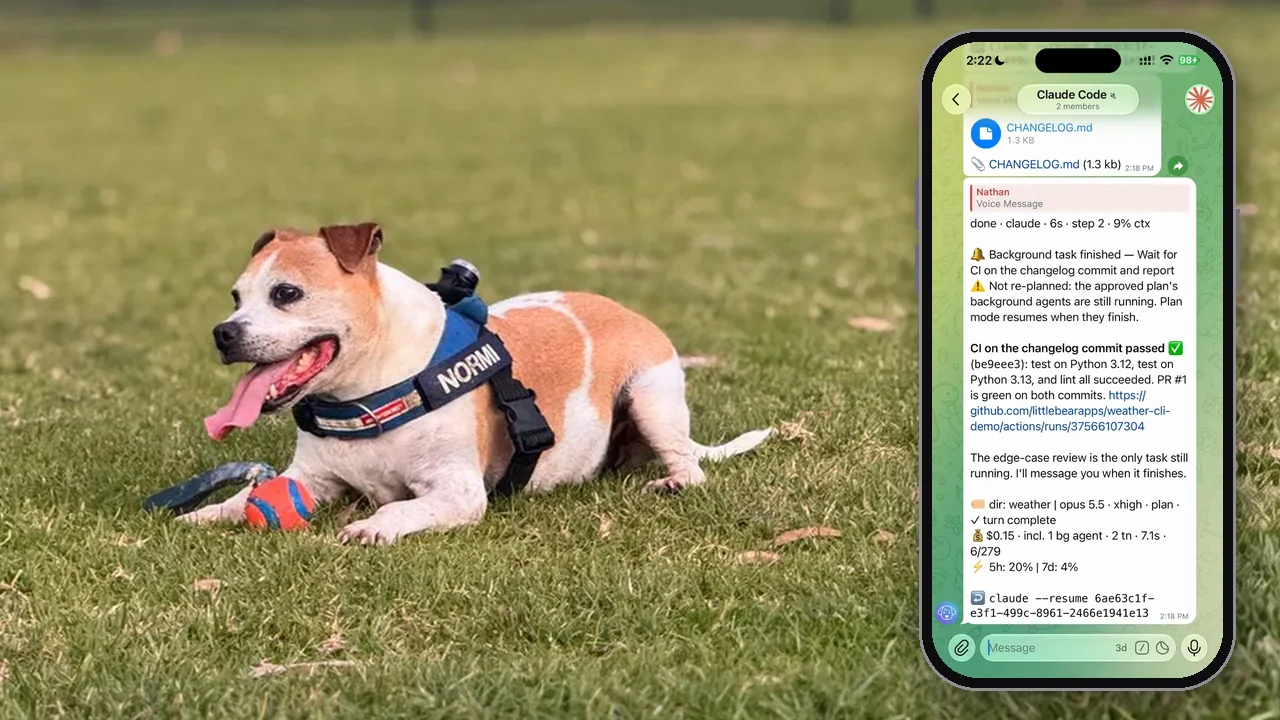
"I was walking Normi and had an idea for a fix. By the time I got home and opened my laptop, I'd forgotten half of it."

Nathan
N
Nathan

Questions about Untether

What is Untether?
Untether is a Telegram bridge that connects AI coding agents to your phone. Send tasks by text or voice, watch progress in real time, and approve changes with inline buttons. It works with Claude Code, Codex, OpenCode and Pi, and the agent keeps running if you close Telegram or lose signal.
Does Untether send my code to Little Bear Apps?
No. Messages go between Telegram and the agent running on your machine, and Little Bear Apps never sees your code, messages or agent output. Untether has no telemetry or analytics. Its own outbound calls are the Telegram Bot API, Anthropic's subscription-usage endpoint for Claude (using Claude Code's existing login) and, only if you turn voice notes on, your transcription endpoint.
Do I need a Telegram account?
Yes. The setup wizard creates the bot for you, or you can give it an existing token from @BotFather. The bot runs on your machine and only responds to your Telegram user ID.
Can I use voice notes?
Yes. Untether transcribes voice notes via a configurable Whisper-compatible endpoint, and the transcription is sent to your agent as a text message.
Does it work with other AI coding agents?
Untether supports four engines: Claude Code, Codex, OpenCode (1.x) and Pi. Claude Code gets the deepest integration, including interactive approvals, plan mode, live sessions and /steer. Switch engines per message (/codex …) or per chat (/agent set claude). Gemini CLI and Amp still ship but are deprecated as of v0.36.0, with no testing or fixes, and may be removed later. Antigravity CLI, Gemini CLI's successor, is due as its own engine in v0.36.1.
Can I control multiple projects at once?
Yes. Register multiple repos with untether init and switch between them from Telegram using project-specific commands or forum topics.
Is there a cost for using Untether?
Untether itself is free and open source (MIT licence), and the Telegram Bot API is free. You can use your existing Claude or ChatGPT subscription, so you don't need extra API keys unless you want API billing. Per-run and daily budgets, with an optional Stop at limit, keep spending in check.
How do I restrict access to my bot?
Set allowed_user_ids in untether.toml to your Telegram user ID, and the bot ignores messages from anyone else. In group chats, approval_originator_only means only the person who started a run can tap its approval buttons.
How do I set up Untether?
Install with uv tool install untether (or pipx install untether), then run untether. The setup wizard creates your Telegram bot (or takes an existing token), picks a workflow mode (assistant, workspace or handoff) and connects your chat.
Can I continue a previous session?
Yes. Reply to any bot message to resume that session, or the agent picks up where it left off automatically. You can also use /continue to pick up a session you started in your terminal — works with Claude Code, Codex, OpenCode and Pi.
Can I run multiple tasks at the same time?
Yes. Use forum topics or separate project chats to run tasks in parallel. Branch targeting with @branch runs in isolated git worktrees so tasks don't interfere with each other.
Can I automate recurring tasks?
Yes. Send /at 30m … for a one-off run, add cron or webhook triggers in untether.toml, or turn on Loop mode so Claude's /loop schedules run with iteration and time caps. Nobody is there to tap a button when a cron fires, so give unattended Claude crons an explicit permission_mode.
Can I send a follow-up while the agent is still working?
Yes, with Claude Code. By default a message sent mid-run waits for the turn to finish. Send /steer with your text, or set steer as the chat's default follow-up mode, and it goes straight into the running session. Background tasks keep the session open, and their results arrive as their own messages.
What changed in v0.36.0?
Live sessions, /steer, background-task status, context-window use in the status line and a working Stop at limit for budgets. It also has breaking changes: the old auto permission mode is now plan-auto, unattended crons deny approvals, Codex safe mode is now a real read-only sandbox, and Gemini CLI and Amp are deprecated. If you're upgrading from 0.35.x, read the upgrade notes in the help centre first.

Changelog

github-actions[bot]github-actions[bot]