I voice-code from my phone while walking my dog
I dictate coding tasks to Claude Code via Telegram voice notes while walking my dog. Voice input is 4x faster than typing on a phone.
 Nathan Schram
 On this page
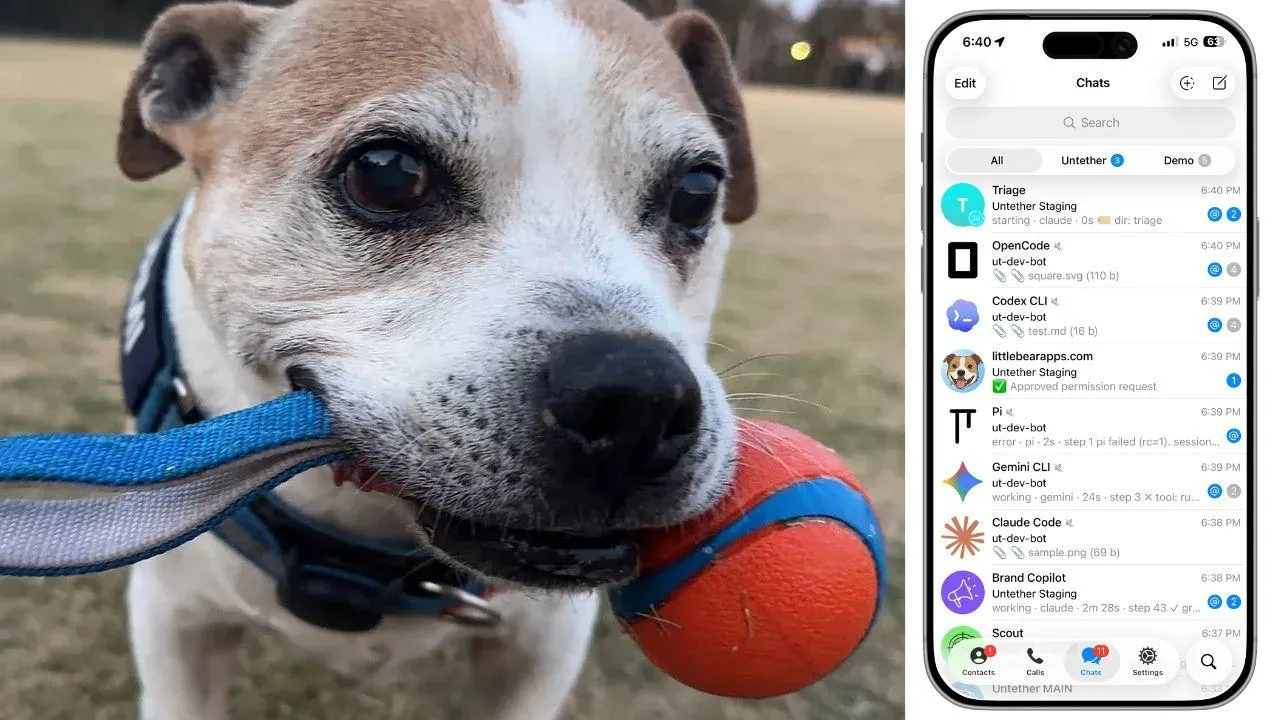
Last Wednesday afternoon I was at the oval with Normi, my 13-year-old dog, playing tug of war with his favourite rope ball. Between rounds I pulled out my phone, recorded a voice note asking Claude Code to run the full engine test suite across six Telegram chats, and went back to playing. Twenty minutes later, Normi and I were both sitting on the grass, absolutely pooped. I checked Telegram. Claude Code had finished testing, logged the bugs it found, and created GitHub issues for each one. I hadn’t typed a single character.
That’s most of my afternoons now.
TL;DR:
- I spend 2-4 hours a day walking my 13-year-old dog Normi. During those walks, I dictate coding tasks to Claude Code via Telegram voice notes using Untether.
- Voice input is roughly 4x faster than typing on a phone (150 WPM speaking vs 40 WPM typing). The walks themselves boost creative output by 60% compared to sitting (Stanford, 176 participants).
- This isn’t a novelty. It’s how I work every day. Honestly, I get more done on walks than I do at my desk.
Simon Willison put it well back in November 2024: “Coding while walking the dog is an underrated benefit of AI tooling.” He never wrote the detailed post. So here it is.
The problem: AI coding agents need you at a terminal
AI coding agents are genuinely useful. 71% of developers who regularly use AI agents use Claude Code (Pragmatic Engineer survey, 15,000 developers, Feb 2026). 4% of all public GitHub commits are now authored by Claude Code (SemiAnalysis, Feb 2026).
They all share one assumption: you’re sitting at a terminal.
Claude Code runs in a terminal. You watch it work. It asks permission to edit files or run commands. You type y or n. If you walk away, it stalls. The session just sits there waiting for you to come back and press a key.
I’m a vibe coder. Not CS-trained, background in sales and ops, 13 years in tech. I run Little Bear Apps in Melbourne and I build tools to scratch my own itch. And I kept finding myself mid-session with Claude Code on my MacBook, absolutely in the zone, when I had to leave. Walk the dog. Go to the shops. Whatever. I hated it. Every time I walked away, the session died.
I tried the Blink shell iOS app with TMUX and MOSH connecting to my VPS. That worked okay. I could at least see the terminal from my phone. Typing on a tiny screen while holding a leash isn’t great.
There are official solutions now. Claude Code Remote Control (February 2026) lets you scan a QR code from the Claude mobile app. Claude Code Channels (March 20, 2026) adds Telegram and Discord support through MCP. Both are Claude-only, text-only, and Channels still pauses at the terminal when it needs permission.
As of March 2026, none of them support voice input, multiple AI engines, or interactive permission buttons from a phone. I needed a proper remote coding workflow - one where I could speak a task into my phone while walking my dog and have it just… work. Including the permission prompts.
How I found takopi and why I rebuilt it
I found banteg/takopi in late December 2025. It’s a Telegram notifier for AI coding agents, and at first it was an absolute godsend. I could hook up voice-to-text transcription via Telegram, record a voice note, and it would send the task to Claude Code. Brilliant.
Then I hit the wall.
Takopi doesn’t handle Claude Code’s interactive bits. When Claude Code needs permission to run a command, or wants to exit plan mode to implement something, or asks you a question, Takopi just… freezes. The agent sits there waiting for input that never comes. Your Telegram chat goes silent. You don’t even know it’s stuck unless you check.
I opened issues. I waited three, maybe four weeks for a response from banteg on the repo. Nothing. The bugs are still there today.
So I forked it and rebuilt it. Untether launched in February 2026, and it’s been my primary development tool since.
The setup: what connects to what
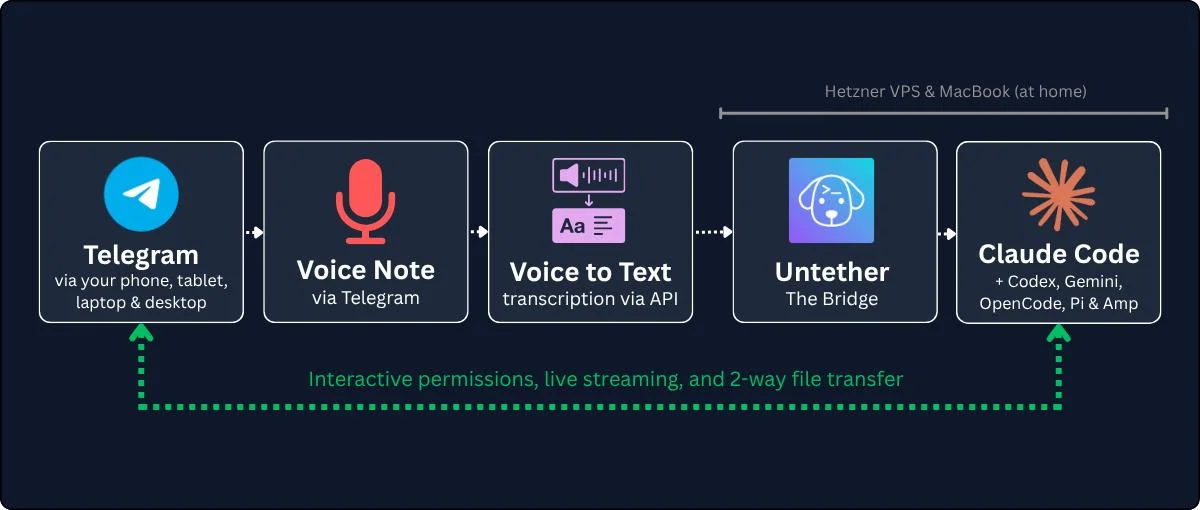
The chain looks like this:
iPhone (Telegram app) -> Telegram Bot API -> Untether (Python, running on my VPS) -> Claude Code (also on my VPS)
The VPS (virtual private server) matters. I run Untether and Claude Code on a Hetzner server in Germany. Not on my MacBook, not on my home network. This means I don’t care if the power’s on at home, if my MacBook is sleeping, or if my home internet drops. The VPS is always on. Even if my phone dies mid-walk, the coding agent keeps working. I’ll see the results when I get back. (The VPS also runs the infrastructure I wrote about in how a D1 billing disaster taught me to build circuit breakers.)
Untether is open source, Python 3.12+, and installs with one command:
uv tool install untetherThe key pieces:
Voice transcription. When I record a voice note in Telegram, Untether sends it to a Whisper-compatible endpoint via Groq for transcription, then passes the text to Claude Code as a task. I don’t type on my phone. I talk.
Progress streaming. As Claude Code works, Untether streams updates to my Telegram chat. Tool calls, file changes, elapsed time. I can watch it think in real time or just check back later.
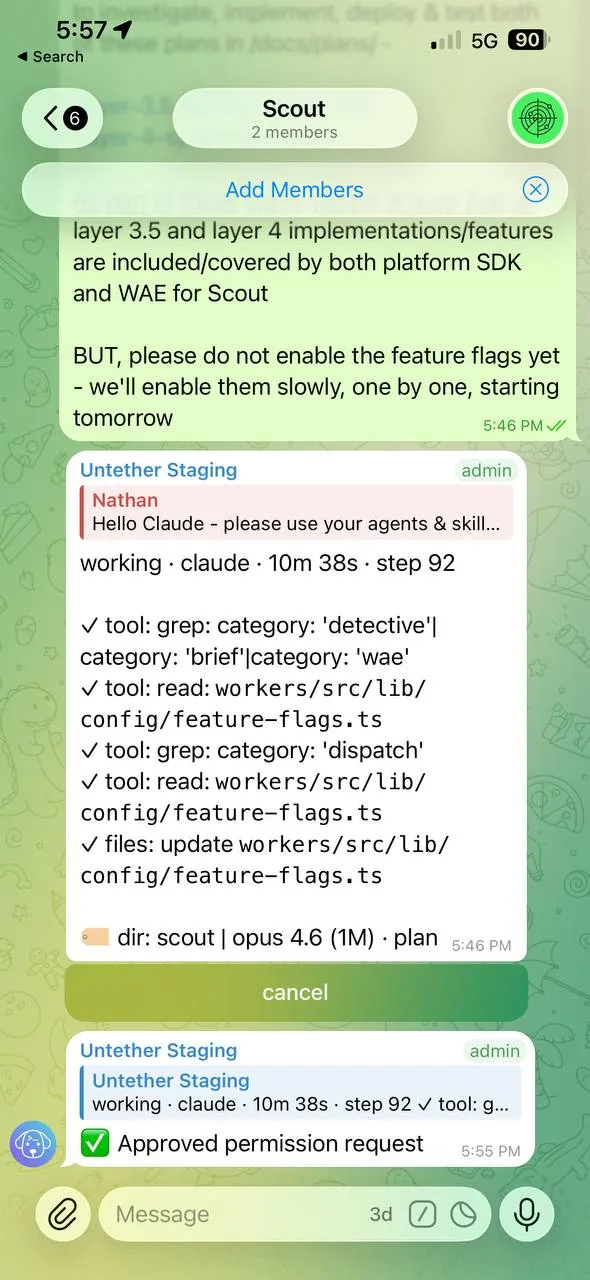
Interactive permissions. This is the part that makes it actually usable away from a terminal. When Claude Code needs to run a command, edit a file, or exit plan mode, Untether shows me inline Telegram buttons. Approve, Deny, or reply with instructions. No terminal required.
I leave plan mode on and I leave permissions on. I prefer to have some control rather than letting Claude Code just go wild. I built a custom button called “Pause and outline plan” that forces Claude Code to write out a detailed plan before it does anything. In the version I’m about to ship (v0.35.0), I’ve added a second step after that: Approve, Deny, and a new “Stop and let’s discuss” button. Sometimes you want to talk it through before committing.
Multiple engines. Untether isn’t locked to Claude Code. It supports Codex, OpenCode, and Pi today, with Gemini CLI and Amp coming. I mostly use Claude Code, but the multi-engine support matters for testing. I have one Telegram chat per engine, and Claude Code can actually switch between them during automated test runs using a Telegram MCP server I helped fix (we submitted a PR fixing an entity cache bug that broke 87% of operations for session-based users).
One thing worth knowing if you use multiple engines: each one has its own context file format. Claude Code reads CLAUDE.md, Codex wants agents.md, Gemini has its own thing. If you’ve only set up context for one engine, the others will still work but they’ll take longer to get oriented. Your directory-level context, global context, working directory structure - all of it matters. Get your infrastructure right and Untether works perfectly regardless of which engine you’re talking to.
Why does talking beat typing on a phone?
Speaking is roughly 4x faster than typing on a phone screen. 150 words per minute speaking versus about 40 WPM thumb-typing (Wispr Flow). On a walk, with a leash in one hand, that difference matters.
Speed isn’t the real advantage, though. The real advantage is that talking forces you to think out loud, and thinking out loud produces better prompts.
When I type a task for Claude Code at my desk, I tend to be terse: “refactor the auth middleware.” When I’m walking and talking, I naturally add context: “Hey, the auth middleware in Viewpo is getting messy - the session validation is mixed in with the role checking. Can you split those into separate middleware functions? Keep the existing tests passing.”
The voice prompt is longer, more specific, and gives Claude Code more to work with. I’m not trying to be thorough. I’m just talking the way people talk.
I’m a waffler. I love to talk things out, talk things through, often just to crystallise something for myself as I say it. Claude Code takes that waffle and rearranges it into something structured. It’s a surprisingly good loop: I ramble with context, Claude Code extracts the actual task.
What voice transcription gets wrong
Honestly? Not much. As long as you speak reasonably loudly and clearly, Groq handles it well. I’ve only had a couple of times where words genuinely got mangled beyond recognition.
If I’m mumbling, or doing my neurodiverse ADHD waffle thing where I’m jumping between thoughts mid-sentence, yeah, it can struggle a bit. But Claude Code is pretty good at inferring intent even from imperfect transcription. Most of the time, close enough is close enough.
How do you handle AI permissions from your phone?
AI coding agents from your phone have a problem: the agent is going to ask you questions. It’s going to want permission to delete files, run tests, push code. If you can’t respond to those prompts, the session stalls.
Takopi didn’t handle this. You could send a task, but when Claude Code hit a permission prompt, everything just stopped until you got back to a terminal.
Untether solves this with inline Telegram buttons:
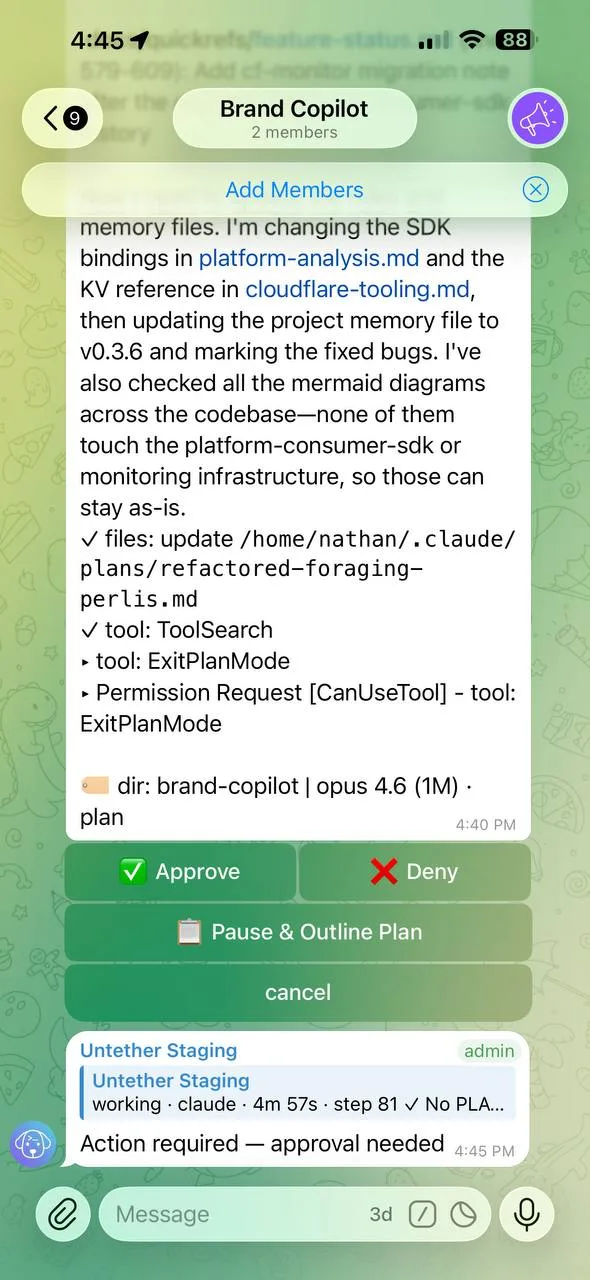
- Plan mode toggles per-chat. I leave it on. When Claude Code wants to implement a plan, I get buttons: Approve, Deny, or my custom “Pause and outline plan”
- Approve/Deny buttons appear inline when Claude Code needs permission for destructive operations
- Progressive cooldown reduces prompt frequency for repeated similar actions
- Ask mode lets Claude Code ask me questions through Telegram. I can reply with text or another voice note
- Cost controls with per-run and daily budgets,
/usagebreakdowns. Important when you’re kicking off tasks and walking away
The “Pause and outline plan” button is one I built for my own workflow. Claude Code in plan mode is a life saver. I’d rather read a plan and approve it than have the agent just start editing files. And in v0.35.0, after Claude Code writes the outline, you get three choices: approve it, deny it, or hit “Stop and let’s discuss” if you want to talk it through first.
This is the part that makes the workflow real rather than theoretical. Without interactive permissions, “code from your phone” means “start a task and hope for the best.” With them, I have the same control I’d have at my desk. Just through buttons instead of keystrokes.
What a real walk looks like
Normi is 13. He’s a 16-kilo staffy cross pug cross French bulldog. A little fun-sized potato. Super friendly with everyone, loves people, tolerates cats, and sounds absolutely vicious when he plays. He isn’t. He’s having the time of his life.
We go out two or three times a day. Sometimes we do the same tracks and parks we always do, sometimes we explore new ones. I’m outside for probably two to four hours total, depending on the weather and what we’re up to. We’ll often stop at an oval so Normi can play.
I call the game “grrrrr” - which is basically the noise Normi makes while playing it. It’s tug of war combined with chasey. I got these nearly indestructible dog balls with tug of war ropes on them, and Normi goes absolutely feral for them. He grabs one end, I grab the other, and he growls and shakes his head like he’s fighting a crocodile. Then he bolts and wants me to chase him. Then he comes back and wants to do it again. For years I’d try to get him to drop the ball and he’d just stand there growling. “Norman. Come on.” Only took me about a decade to realise he didn’t want to drop it - he wanted the fight. He’s an expert at grrrrr. Arguably he’s never lost.

Between rounds of grrrrr, while Normi’s catching his breath (or more often, while he’s pretending he can’t hear me calling him back), I pull out my phone and check Telegram. There’s usually a response from Claude Code waiting in one of my working directory chats. I read it, record a quick voice note with the next task, put my phone away, and go back to playing.
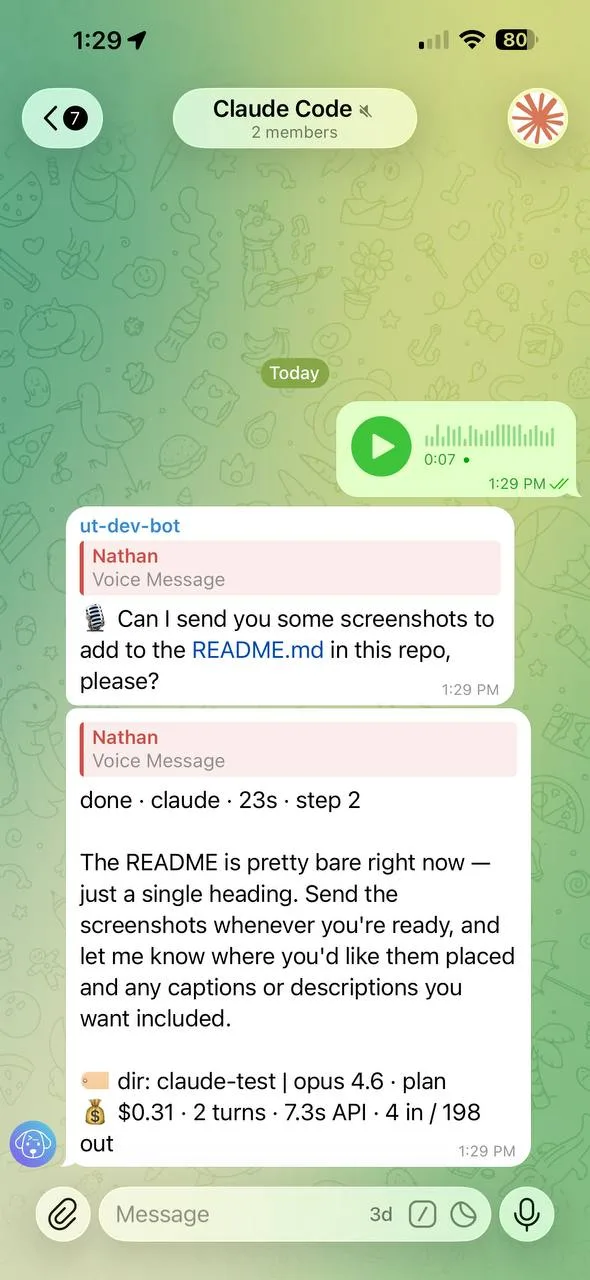
Five or ten minutes later I check again. Claude Code has been working the whole time. I might have three or four different working directory chats going - one time I had five or six running in parallel, testing bug fixes in the Untether repo while making website updates and working on various other projects at the same time.
After thirty or forty minutes, Normi and I are both sitting on the grass, absolutely pooped, having a drink. And Claude Code is still working away on the VPS, finishing up the last task.

This is not work-life balance
Look, I think work-life balance is bullshit. I’ve never been able to find it. And I don’t think most solo devs have either.
But I can go for two or three walks a day with Normi, in the sun or the rain, and be outside for hours. I don’t have to sit in traffic. I don’t have to be in some office. I don’t have to sit through meetings that could have been emails. I can play grrrrr at the oval and check in on my coding agents between rounds. I can be at Coles, on the bus, in bed at 6am. The VPS doesn’t care. Telegram doesn’t care. Claude Code keeps running whether I’m watching or not.
That’s living, I guess. To me, anyway.
The thinking loop
There’s a Stanford study that found walking increases creative output by 60% compared to sitting (Oppezzo & Schwartz, 2014, 176 college students across four experiments). I’m not claiming causation for my own work. But I notice it.
Something about walking with a reasonably clear mind, being outside with Normi, not staring at code - my best task descriptions come out on walks, not at my desk. I think it’s because I’m not lost in implementation details. I’m thinking about what I actually want.
Voice-to-text amplifies this. I’m a talker. I process by talking things through, often just to crystallise something for myself. The walk gives me space to think clearly, I talk it through as a voice note, and Claude Code rearranges my waffle into something structured. The loop works.
What doesn’t work well?
Honestly, most of it works. But there are a few things worth knowing.
Voice notes are great for intent and convenience, but not always good for precision. If I say “the auth middleware needs splitting into two separate functions, keep the tests passing” - that works brilliantly. Dictating actual code syntax is painful no matter how good the transcription is. The trick is prompting the same way you would at your laptop - be descriptive, give context, explain what you want and why. As long as you do that, voice works just as well as typing. The issue is never the voice input. It’s being vague.
Screen size. Reading a 200-line diff on a phone screen isn’t great, I’ll be honest. I’ll skim the progress updates on a walk, approve or deny the obvious stuff, and do a proper review when I get home to a real screen. The agent handles the straightforward decisions - formatting, renames, clear-cut logic changes - and I handle the ones that need thought.
Mobile signal. This is actually one of the best bits about the whole setup. Your AI agents run on the VPS, not your phone. If you lose mobile coverage walking through a dead zone or duck into a building with no signal, the agents keep working. They don’t care that your phone went quiet - they’re on a server in Germany. When you find coverage again, all the updates are sitting there in Telegram waiting for you. Nothing stalls, nothing breaks. Telegram queues messages beautifully.
Deep architecture sessions. If I need to trace through a complicated chain of files or make big architectural decisions, I’ll sometimes save that for home with a proper screen. But even then, I’ve been surprised how far I can get by just being clear in my voice prompts: “Create a plan and save it. Don’t implement yet. Let’s discuss first.” Going back and forth on plans through voice notes genuinely works.
Transcription and mumbling. If I’m not speaking clearly, or doing my ADHD thing where I jump between thoughts mid-sentence, transcription quality drops. Speak clearly and you’ll be fine. Mumble and you’ll confuse everyone, including the AI.
The big thing for me is that using Untether means I actually get to enjoy the walks more, not less. I’m not hunched over a tiny keyboard slowly typing out messages. A voice note takes seven seconds, then I’m back to playing with Normi. The rest of the time I’m genuinely present - outside, moving, not staring at a screen. That’s the whole point.
Getting started
If this workflow sounds useful, here’s how to try it:
- Install Untether:
uv tool install untether(requires Python 3.12+) - Create a Telegram bot via @BotFather
- Configure
untether.tomlwith your bot token and Claude Code path - Register your projects:
untether init <shortname>in each repo - Send your first task as a text message or voice note
You don’t need a VPS. You can run Untether on your laptop. But if you want the “my phone can die and work continues” setup, a cheap VPS does the trick. I use Hetzner.
Untether is free and open source: github.com/littlebearapps/untether
Normi and I will be at the oval either way. Might as well ship something while we’re there.