How to Investigate Email Headers
Read forensic email headers to verify sender authenticity, trace delivery paths, check DKIM/SPF results, and analyse spam scores.
Examine email headers to verify whether a message is legitimate, trace how it was delivered, and check authentication results like DKIM and SPF.
When you need this: a colleague reports a suspicious email claiming to be from your CEO; your security team is investigating a potential business email compromise; compliance requires you to verify the origin of a message before acting on it; or you’re building an automated phishing detection workflow. Email header forensics answer the question: “Is this email actually from who it claims to be?”
Get All Headers
“Show me the headers for that suspicious email”
tool: read-email
params:
  id: "AAMkAGR..."
  headersMode: true
This returns the full set of email headers instead of the message body.
Show Only Important Headers
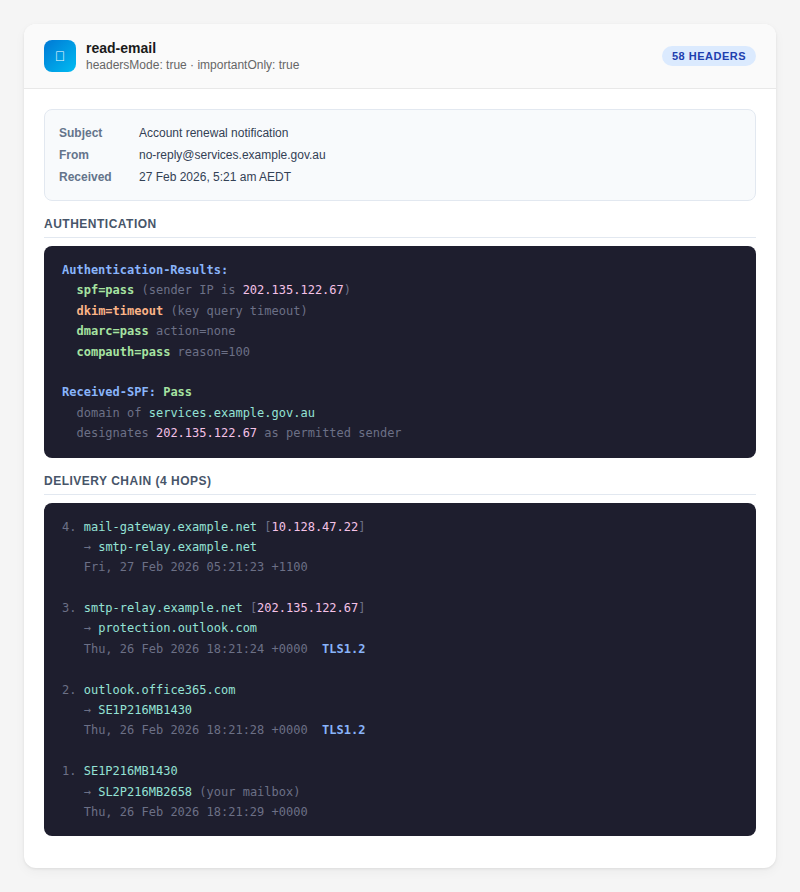
Filter out noise and see the headers that matter most:
tool: read-email
params:
  id: "AAMkAGR..."
  headersMode: true
  importantOnly: true
Important headers include: From, To, Subject, Date, Message-ID, DKIM-Signature, Authentication-Results, Received (first and last), X-MS-Exchange-Organization-SCL.
Group Headers by Category
tool: read-email
params:
  id: "AAMkAGR..."
  headersMode: true
  groupByType: true
Headers are grouped into categories: routing, authentication, Microsoft Exchange, and other.
What to Look For
DKIM (DomainKeys Identified Mail)
DKIM verifies the email hasn’t been tampered with in transit.
| Result | Meaning |
|---|---|
dkim=pass | Email is authentic and unmodified |
dkim=fail | Email may have been altered or is forged |
dkim=none | Sender doesn’t use DKIM |
SPF (Sender Policy Framework)
SPF verifies the sending server is authorised to send for that domain.
| Result | Meaning |
|---|---|
spf=pass | Legitimate sending server |
spf=fail | Unauthorised server — possible spoofing |
spf=softfail | Server not explicitly authorised but not rejected |
DMARC
DMARC combines DKIM and SPF with a policy decision.
| Result | Meaning |
|---|---|
dmarc=pass | Both DKIM and SPF align — trusted |
dmarc=fail | Authentication failed — likely spoofed or misconfigured |
Spam Confidence Level (SCL)
Microsoft’s spam score, found in X-MS-Exchange-Organization-SCL:
| SCL | Meaning |
|---|---|
| -1 | Trusted sender (safe list) |
| 0–1 | Not spam |
| 5–6 | Likely spam |
| 9 | High-confidence spam |
Received Headers (Delivery Chain)
Each mail server adds a Received: header. Read them bottom-to-top to trace the delivery path from origin to your mailbox. The bottom Received header shows the original sending server.
Tips
- Use
importantOnly: truefor a quick check — it covers 90% of investigations - Use
groupByType: truefor a structured view when doing thorough analysis - Compare the
Fromheader with theReturn-Path— mismatches may indicate spoofing - For raw JSON output (for scripting), add
raw: true
Related
- Read Email Threads — read the email body
- Find Emails — find the suspicious email first
- Export Emails — export with full MIME headers
- Tools Reference — read-email

