Voice notes
Dictate coding tasks hands-free — while walking, driving, or away from a keyboard.

Dictate coding tasks hands-free — while walking, driving, or away from a keyboard. Untether transcribes your Telegram voice notes via a Whisper-compatible endpoint and runs them as normal text prompts.
Enable transcription
untether config
untether config set transports.telegram.voice_transcription true
untether config set transports.telegram.voice_transcription_model "gpt-4o-mini-transcribe"

# local OpenAI-compatible transcription server (optional)
untether config set transports.telegram.voice_transcription_base_url "http://localhost:8000/v1"
untether config set transports.telegram.voice_transcription_api_key "local"
untether config set transports.telegram.voice_transcription_url_allowlist '["127.0.0.0/8"]'
untether config set transports.telegram.voice_transcription_language "en"
toml
[transports.telegram]
voice_transcription = true
voice_transcription_model = "gpt-4o-mini-transcribe" # optional
voice_transcription_base_url = "http://localhost:8000/v1" # optional
voice_transcription_api_key = "local" # optional
voice_transcription_url_allowlist = ["127.0.0.0/8"] # required for a loopback/private endpoint (see below)
voice_transcription_language = "en" # optional ISO-639-1 hint — stops wrong-language guesses on short notes
Set OPENAI_API_KEY in your environment (or voice_transcription_api_key in config).
To use a local OpenAI-compatible Whisper server, set voice_transcription_base_url
(and voice_transcription_api_key if the server expects one). This keeps engine
requests on their own base URL without relying on OPENAI_BASE_URL. If
voice_transcription_base_url is unset, the OpenAI client falls back to OPENAI_BASE_URL
when that environment variable is set, and to api.openai.com otherwise. If your server
requires a specific model name, set voice_transcription_model (for example,
whisper-1).
Local/private endpoints need an allowlist (v0.35.4+)
Since v0.35.4 the transcription base URL is SSRF-validated (#381) — a loopback or private-network host (like
http://localhost:8000/v1) is rejected to stop a misconfigured URL exfiltrating voice audio to an internal service. To use a local Whisper server, opt it back in with a CIDR/IP allowlist:voice_transcription_url_allowlist = ["127.0.0.0/8"] # or your private range, e.g. an Azure private-link CIDRThe default public path (
api.openai.com, i.e.base_urlunset) skips validation and needs no allowlist.A private or loopback IP literal (such as
http://127.0.0.1:8000/v1) without a matching allowlist entry fails at config load (voice_transcription_base_url is not permitted, with the entry to add). A hostname such aslocalhostcan only be checked once it is resolved, so it is refused when a voice note is transcribed.Since v0.36.0 (#679), a refused voice note gets a reply that names the blocked host and the exact entry to add, for example
voice_transcription_url_allowlist = ["127.0.0.0/8"]forlocalhost. For a private or tailnet host (Tailscale uses100.64.0.0/10), the reply suggests that single IP rather than the whole range. The same check runs at startup and after a hot-reload of a voice endpoint key, so a blocked endpoint shows up in the log asvoice.base_url.not_permittedbefore anyone sends a voice note. Link-local and cloud-metadata addresses (169.254.x) are never suggested.
Hot-reload
Voice transcription settings (
voice_transcription, model, base URL, API key, prompt) can be toggled by editinguntether.toml— changes take effect immediately without restarting (requireswatch_config = true).
Improve recognition of names
Speech-to-text tends to mangle tool and project names (“Clawed Code”, “trollo”) while getting the rest of the sentence right. Untether sends the transcription API a short vocabulary hint so those words come out right (#703, #789). The built-in hint is:
Claude, Claude Code, CLAUDE.md, AGENTS.md, Codex, OpenCode, Untether, Telegram, MCP, CLI, repo, changelog, PyPISet your own with voice_transcription_prompt. It replaces the built-in hint rather than adding to it, so include any of those words you still want:
[transports.telegram]
voice_transcription_prompt = "Claude Code, CLAUDE.md, Codex, Trello, happy-gadgets, Cloudflare"- Leave the key out to use the built-in hint; set it to
""to send no hint at all. - Keep it to a comma-separated list of names, well under Whisper’s ~224-token prompt window (Whisper keeps only the last ~224 tokens). The value is limited to 1,000 characters.
- The prompt is never written to the logs, so private project names are safe to include.
A hint only nudges the model, and Whisper still often writes the name Claude as “Clawde”. Untether therefore also fixes the known misspellings in the transcript itself (#789): “Clawde” / “Clawd” / “Clode” become Claude, “Clawed Code” / “Corde Code” / “Clode Code” become Claude Code, and “Claw.md” / “Clawde.md” / “Clode.md” become CLAUDE.md. Ordinary words are left alone (“the cat clawed” and “a clod of earth” stay as they are). This applies whatever your voice_transcription_prompt is, and the 🎙 echo shows the corrected text.
Behaviour
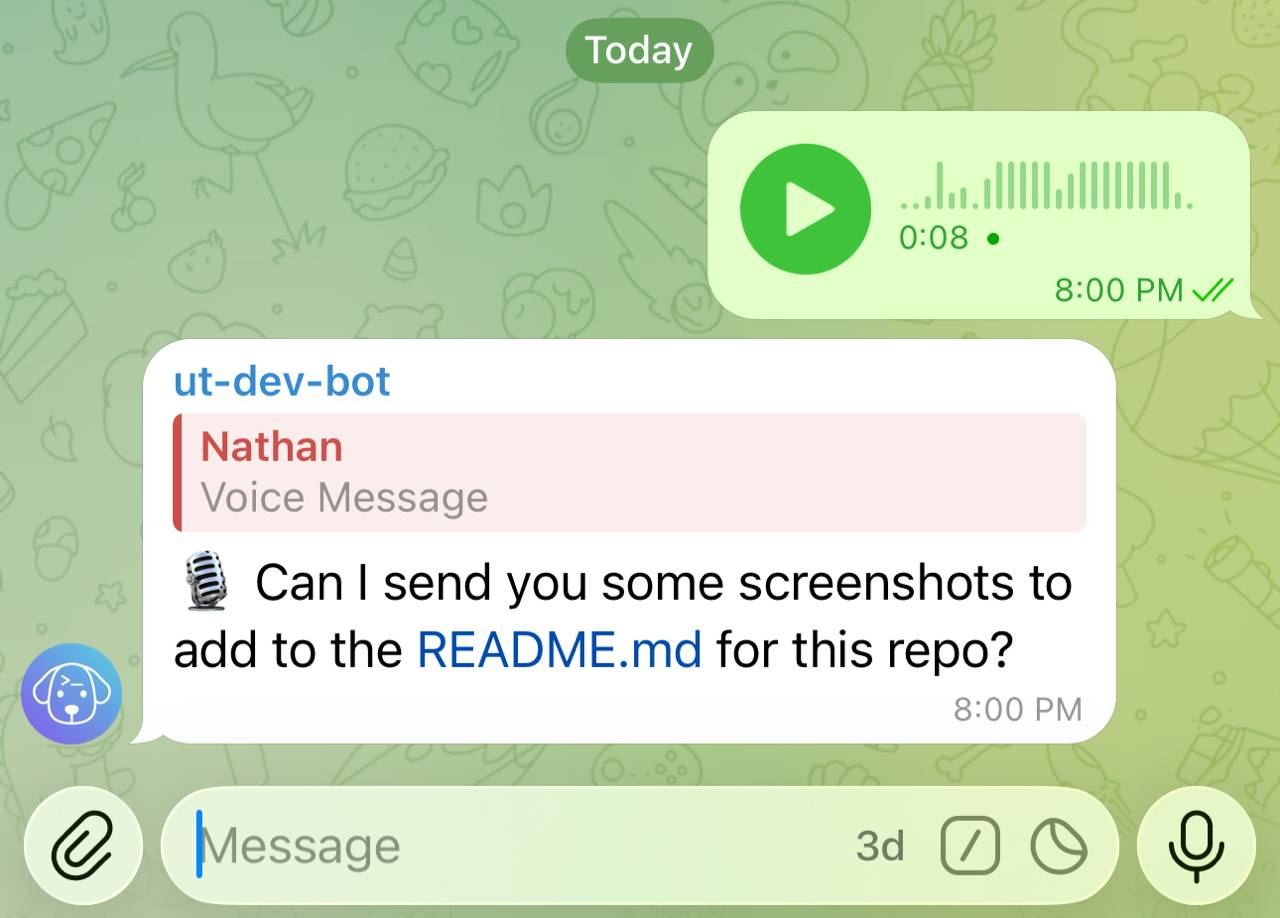
When you send a voice note, Untether transcribes it and runs the result as a normal text message.
Untether echoes the transcript back as a 🎙 … reply before the run starts; set voice_show_transcription = false under [transports.telegram] to skip the echo. If transcription fails, you’ll get an error message and the run is skipped. In a chat set to steer, a voice note sent while Claude is working is steered into the run like a typed message.
You
🎤 (voice note — 0:12)
Untether
🎙 Add error handling to the upload function and make sure it retries on timeout
working · claude · 0s
▸ Read
src/upload.py