

Projects and branches
This tutorial shows you how to register repos as projects and run tasks on feature branches — all from Telegram, without touching a terminal.

This tutorial shows you how to register repos as projects and run tasks on feature branches — all from Telegram, without touching a terminal. Jump between repos from wherever you are; your machine handles the checkout.
What you’ll learn: How to target repos from anywhere with /<project-alias>, and run on branches with @branch.
The problem
So far, Untether runs in whatever directory you started it. If you want to work on a different repo, you have to:
- Stop Untether
cdto the other repo- Restart Untether
Projects fix this. Once you register a repo, you can target it from chat—even while Untether is running elsewhere.
Quick background: branches and worktrees
Already familiar with git branches?
Skip to step 1.
A branch is a separate line of development in your code. Think of it like a draft — you can make changes on a branch without touching the main version. When the changes are ready, the branch gets merged back. Branches let your agent work on a feature (feat/new-login) or fix (fix/memory-leak) in isolation.
A worktree is a separate folder that checks out a branch. Normally, switching branches changes the files in your project directory. With worktrees, each branch gets its own folder — so the agent can work on feat/new-login in one folder while your main code stays untouched in another. Untether creates and manages worktrees for you automatically.
You don’t need to understand git deeply to use projects and branches. The key idea: prefixing a message with /<project> @branch runs the agent on that branch, in a separate folder, without disrupting anything.
See also: glossary for definitions of these and other terms.
1. Register a project
Navigate to the repo and run untether init:
cd ~/dev/happy-gadgets
untether init happy-gadgets
Output:
saved project 'happy-gadgets' to ~/.untether/untether.tomlThis adds an entry to your config. Besides path, untether init writes worktrees_dir = ".worktrees", default_engine (your current global default, so the project keeps it if you change the global one later) and, when it can detect one, worktree_base. The minimal equivalent is:
untether config
untether config set projects.happy-gadgets.path "~/dev/happy-gadgets"toml
[projects.happy-gadgets]
path = "~/dev/happy-gadgets"
Project aliases are also Telegram commands
The alias becomes a
/commandyou can use in chat. Keep them short and lowercase:myapp,backend,docs.
2. Target a project from chat
Now you can start Untether from another repo. If you don’t specify a project, Untether runs in the directory where you launched it.
cd ~/dev/your-project
untether
And target the project by prefixing your message:
You
/happy-gadgets explain the authentication flow
Untether runs the agent in ~/dev/happy-gadgets, not your current directory.
The response includes a context footer:
Untether
dir: happy-gadgets
codex resume abc123
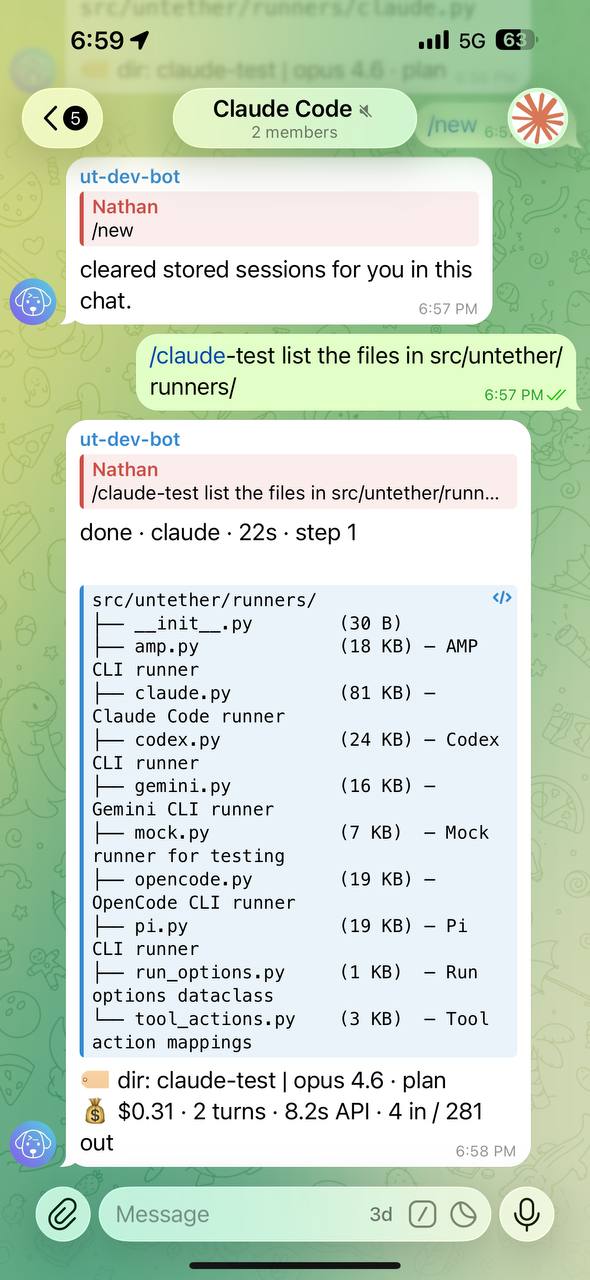
That dir: line tells you which project is active. When you reply, Untether automatically uses the same project—you don’t need to repeat /happy-gadgets.
3. Set up worktrees
Worktrees let you run tasks on feature branches without touching your main checkout. Instead of git checkout, Untether creates a separate directory for each branch.
There’s nothing to switch on: untether init already set worktrees_dir, and it defaults to .worktrees anyway. Change these keys only if you want branches somewhere else or cut from a different base:
untether config
untether config set projects.happy-gadgets.path "~/dev/happy-gadgets"
untether config set projects.happy-gadgets.worktrees_dir ".worktrees"
untether config set projects.happy-gadgets.worktree_base "main"
toml
[projects.happy-gadgets]
path = "~/dev/happy-gadgets"
worktrees_dir = ".worktrees"      # where branches go
worktree_base = "main"            # base for new branches
Ignore the worktrees directory
Add
.worktrees/to your global gitignore so it doesn’t cluttergit status:echo ".worktrees/" >> ~/.config/git/ignore
4. Run on a branch
Use @branch after the project:
You
/happy-gadgets @feat/new-login add rate limiting to the login endpoint
Untether:
- Checks if
.worktrees/feat/new-loginexists (and is a worktree) - If the branch exists locally, it adds a worktree for it
- If the branch doesn’t exist, it creates it from
worktree_base(or the repo default) and adds the worktree - Runs the agent in that worktree
The response shows both project and branch:
Untether
dir: happy-gadgets @feat/new-login
codex resume xyz789
Replies stay on the same branch. Your main checkout is untouched.
5. Context persistence
Once you’ve set a context (via /<project-alias> @branch or by replying), it sticks:
You
/happy-gadgets @feat/new-login add tests
Untether
dir: happy-gadgets @feat/new-login
reply to the bot’s answer
also add integration tests
Untether
dir: happy-gadgets @feat/new-login
The dir: line in each message carries the context forward.
6. Set a default project
If you mostly work in one repo, set it as the default:
untether config
untether config set default_project "happy-gadgets"toml
default_project = "happy-gadgets"Now messages without a /<project-alias> prefix go to that repo:
You
add a health check endpoint
Goes to happy-gadgets automatically.
Putting it together
Here’s a typical workflow:
untetherYou
/happy-gadgets review the error handling
You
/happy-gadgets @feat/caching implement caching
Untether
dir: happy-gadgets @feat/caching
You
also add cache invalidation
You
/backend @fix/memory-leak profile memory usage
You
/happy-gadgets bump the version number
All from the same Telegram chat, without restarting Untether or changing directories.
Project config reference
Full options for [projects.<alias>]:
| Key | Default | Description |
|---|---|---|
path | (required) | Repo root. Expands ~. |
worktrees_dir | .worktrees | Where branch worktrees are created (relative to the project path). |
worktree_base | null | Base branch for new worktrees. If unset, Untether uses origin/HEAD, the current branch, or master/main (in that order). |
default_engine | null | Engine to use for this project (overrides global default). |
chat_id | null | Bind a Telegram chat/group to this project. |
Troubleshooting
“unknown project”
Run untether init <alias> in the repo first.
Branch worktree not created
Make sure the worktrees directory (default .worktrees) is writable. If you’ve customised worktrees_dir, verify that path exists or can be created.
Context not carrying forward
Make sure you’re replying to a message with a dir: line. If you send a new message (not a reply), context resets unless you have a default_project.
Worktree conflicts with existing branch
If the branch already exists locally, Untether uses it. For a fresh start, delete the worktree and the branch, or pick a new branch name.
Next
You’ve got projects and branches working. The final tutorial covers using multiple engines effectively.


